

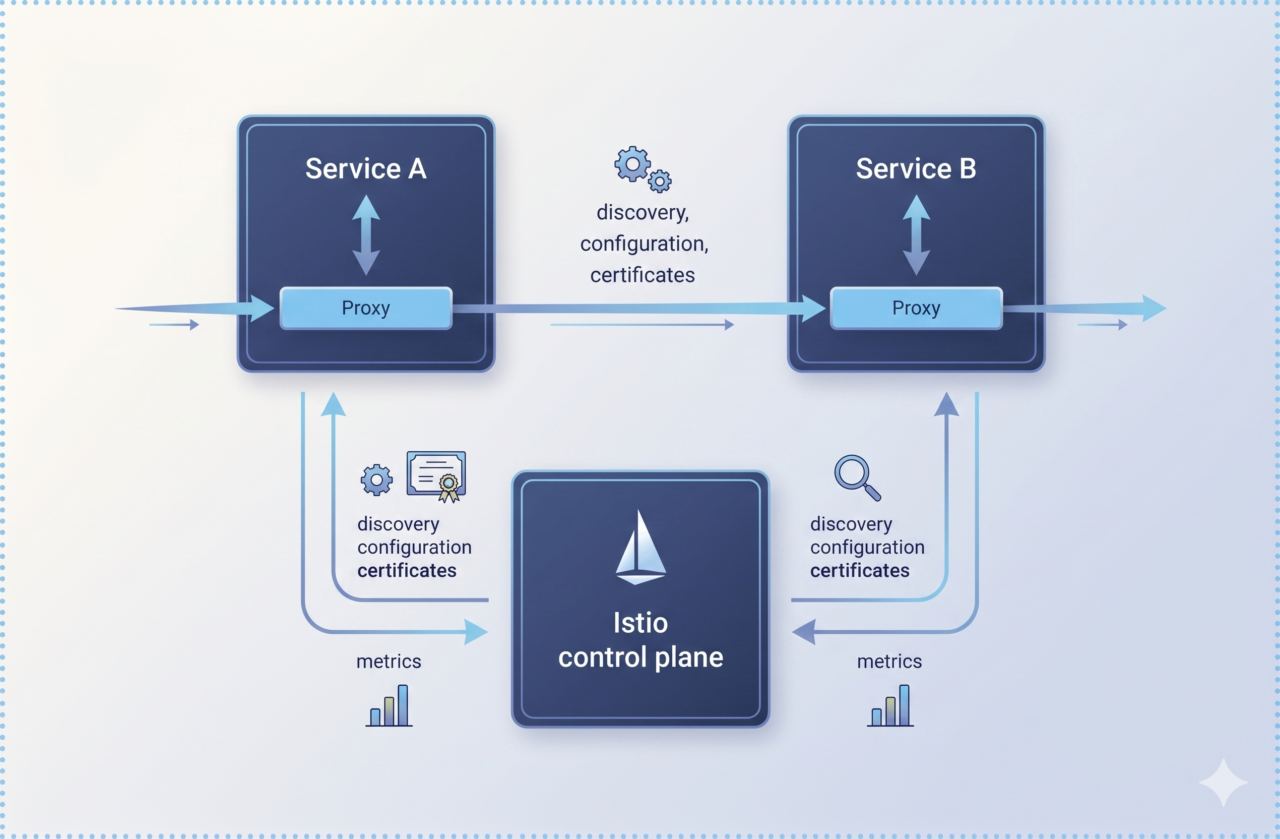
With the official retirement of the community-supported Ingress NGINX controller on March 31, 2026, the Kubernetes networking landscape has reached a turning point. If your organization is still running Ingress NGINX, you are no longer receiving security patches-leaving your clusters exposed to known vulnerabilities such as CVE-2025-1974 (IngressNightmare).
While there are many alternatives, Istio has emerged as the gold standard. By moving to Istio, you aren’t just replacing a controller; you are adopting a standardized, policy-driven architecture that provides zero-trust security (mTLS) and deep observability out of the box.
The 2026 Architectural Shift: A Hybrid Approach
In the past, we relied on a “black box” Ingress model. In 2026, the best practice is a hybrid model: using the Kubernetes Gateway API for infrastructure and Istio Native APIs for fine-grained traffic engineering.
-
Gateway API: The entry point (replacing Ingress). Best for cross-team standardization and “north-south” traffic.
-
VirtualService / DestinationRule: The routing layer. Best for advanced logic like canary deployments, retries, and circuit breaking.
This hybrid model allows teams to standardize infrastructure while still enabling platform engineers to apply advanced traffic policies where needed.
Phase 1: The Pre-Migration Audit
Before modifying your cluster, you must inventory every legacy resource. Use this script to identify Ingress resources still utilizing the retired NGINX class:
# List all Ingress resources using NGINX across all namespaces
kubectl get ingress -A -o json | jq -r '.items[] | select(.spec.ingressClassName=="nginx") | .metadata.namespace + "/" + .metadata.name'
Mapping the Logic
| Feature | Ingress NGINX (Legacy) | Istio / Gateway API (2026) |
| Ingress Entry | Ingress Resource |
Gateway (Gateway API) |
| Traffic Routing | Annotations / Paths | HTTPRoute or VirtualService |
| TLS/SSL | Cert-manager annotations | Gateway listeners + ReferenceGrant |
| Security | whitelist-source-range |
AuthorizationPolicy |
| Large Uploads | proxy-body-size |
EnvoyFilter |
Phase 2: Environment Preparation
1. Install Gateway API CRDs
Ensure you have the latest standardized CRDs (v1.2.0 or higher) installed in your cluster:
kubectl apply -f https://github.com/kubernetes-sigs/gateway-api/releases/download/v1.2.0/standard-install.yaml
2. Install Istio Control Plane
Use the default profile for production-grade telemetry and ingress capabilities:
istioctl install --set profile=default -y
3. Enable Sidecar Injection
Label your application namespace to allow the Istio control plane to manage traffic:
kubectl label namespace <app-namespace> istio-injection=enabled
Phase 3: Technical Implementation (Production-Ready Configuration)
1. Define the Gateway (Infrastructure Layer)
The Gateway defines where traffic enters and which certificates to use.
YAML
apiVersion: gateway.networking.k8s.io/v1
kind: Gateway
metadata:
  name: main-gateway
  namespace: istio-system
spec:
  gatewayClassName: istio
  listeners:
  - name: https
    port: 443
    protocol: HTTPS
    tls:
      mode: Terminate
      certificateRefs:
      - name: global-tls-secret # Secret created by cert-manager
    allowedRoutes:
      namespaces:
        from: All
2. Define the Routing (HTTPRoute)
We use HTTPRoute to catch the traffic at the gateway level and route it to the appropriate namespace.
YAML
apiVersion: gateway.networking.k8s.io/v1
kind: HTTPRoute
metadata:
  name: app-route
  namespace: app-ns
spec:
  parentRefs:
  - name: main-gateway
    namespace: istio-system
  hostnames: ["app.example.com"]
  rules:
  - matches:
    - path: { type: PathPrefix, value: / }
    backendRefs:
    - name: app-service
      port: 80
3. The Cross-Namespace “Handshake” (ReferenceGrant)
In 2026, security is explicit. If your Gateway is in one namespace and your service is in another, you must authorize the connection.
YAML
apiVersion: gateway.networking.k8s.io/v1beta1
kind: ReferenceGrant
metadata:
  name: allow-gateway-to-service
  namespace: app-ns
spec:
  from:
  - group: gateway.networking.k8s.io
    kind: HTTPRoute
    namespace: istio-system
  to:
  - group: ""
    kind: Service
Phase 4: Production Hardening
Source IP Preservation
To use IP-based access control, your ingress service must preserve the client’s original IP:
kubectl edit svc istio-ingressgateway -n istio-system
# Change externalTrafficPolicy to Local
IP-Based Access Control
Replace the old NGINX whitelist annotations with a structured AuthorizationPolicy:
YAML
apiVersion: security.istio.io/v1beta1
kind: AuthorizationPolicy
metadata:
  name: restrict-access
  namespace: istio-system
spec:
  selector:
    matchLabels: { istio: ingressgateway }
  action: ALLOW
  rules:
  - from:
    - source:
        ipBlocks: ["1.2.3.4/24", "5.6.7.8/16"] # Trusted CIDRs only
Enabling Large Payloads
If your applications require large file uploads (e.g., 500MB+), use an EnvoyFilter to adjust the default buffer limits.
YAML
apiVersion: networking.istio.io/v1alpha3
kind: EnvoyFilter
metadata:
  name: increase-upload-limit
  namespace: istio-system
spec:
  configPatches:
  - applyTo: NETWORK_FILTER
    match:
      context: GATEWAY
    patch:
      operation: MERGE
      value:
        typed_config:
          "@type": type.googleapis.com/envoy.extensions.filters.network.http_connection_manager.v3.HttpConnectionManager
          max_request_bytes: 524288000
Note: EnvoyFilters should be used sparingly, as they bypass higher-level abstractions and can increase operational complexity.
Phase 5: Validation and Zero-Downtime Cutover
Before updating DNS, use the Istio diagnostic engine to verify your configuration:
istioctl analyze -A
Zero-Downtime Cutover Strategy
-
Parallel Deploy: Run your new Istio Gateway alongside the existing NGINX controller.
-
Smoke Test: Use
curlwith the Host header to simulate real traffic and verify the new path:curl -H "Host: app.example.com" http://<ISTIO-EXTERNAL-IP> -
Weighted Shift: Use your DNS provider (Cloudflare, Route53) to shift 10% of traffic to the Istio IP.
-
Monitor: Check Kiali and Grafana for latency spikes or 5xx errors.
-
Decommission: After 72 hours of stability, uninstall NGINX:
helm uninstall ingress-nginx -n ingress-nginx
Phase 6: Observability with Kiali
The ultimate benefit of this migration is visibility. Launch the Kiali dashboard to see your traffic topology in real-time.
istioctl dashboard kiali
Conclusion
Migrating from Ingress NGINX to Istio is more than a maintenance task-it is an architectural evolution toward a platform that is secure by default, observable by design, and future-proofed for the next generation of Kubernetes. The transition is no longer optional-it’s the natural next step in the evolution of cloud-native networking.